The Consent Process
After clicking "Connect Metering Point", your metering point goes through several steps before the first data flows. Here we explain what happens at each step and what you need to do.
Status overview
In the metering point overview, you can see the current process status of each metering point at a glance — from "Waiting for user confirmation" to "Failed":
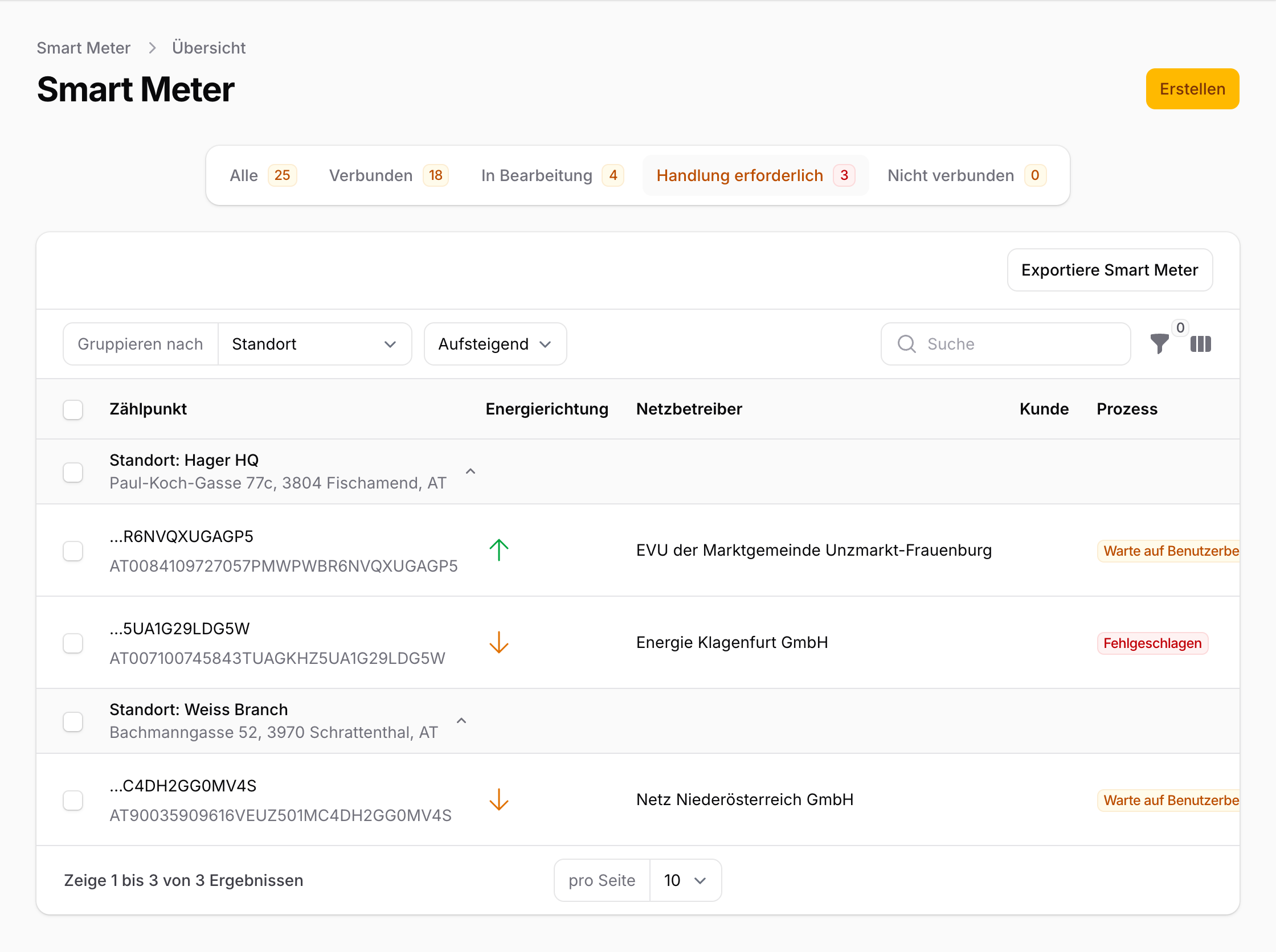
The four phases
1. Connection request sent
You've entered your metering point number. The metering point is created in your account but not yet connected to the EDA network.
2. Request sent to the grid operator
After clicking "Connect Metering Point", we send a data request to your grid operator. They check whether the metering point number is valid and exists in their system.
What you need to do: Nothing. At this step the page updates automatically about once a minute. The grid operator typically responds within a few minutes.
What can go wrong: The grid operator may reject the request — for example if the metering point number does not exist or no smart meter is installed. The metering point then shows the status "Failed" and you'll see an error message with the exact reason. More at Common errors.
Grid operator not yet whitelisted
In rare cases your grid operator is not yet linked to our market-partner profile. This is a one-time manual whitelisting on the grid operator's side. Until that happens, the first request may go unanswered for a week or longer.
When that happens, we contact the grid operator directly. Once they whitelist us, all pending requests are processed automatically — you don't need to do anything.
3. Confirm consent in the portal
Once the grid operator accepts the request, you must confirm the consent in their online portal. This is a legally required step — the grid operator may only share your data after your explicit consent.
What you need to do:
- Click "Open grid operator portal" — the link takes you directly to your grid operator's portal.
- Log in there (using your grid operator credentials, not your energiedaten.at login).
- Confirm the pending data request.
Time limit: You have 30 business days. After that, the request expires automatically and you'll need to start the process again.
4. Data flows
After confirmation, your metering point is connected. Energy data is delivered with a one-day delay (T-1) — meaning you see yesterday's data today.
What you need to do: Nothing. Data is retrieved automatically and displayed in your account. First readings usually arrive within a few hours to 2 days, depending on your grid operator.
More at First Data & Next Steps.
Connecting metering points on behalf of others
If you're an energy service provider, property manager, or energy consultant connecting metering points for your clients, there's an important distinction: you enter the metering point number, but the contract holder must confirm consent in their grid operator's portal. These are two different people.
What this means in practice
- You add the metering point in energiedaten.at and initiate the connection.
- The contract holder (your client, tenant, or building owner) receives the request in their grid operator's portal.
- Only the contract holder can confirm the release — you cannot complete this step on their behalf.
Tips for coordination
- Inform the contract holder in advance that consent in the grid operator's portal will be required. Name the grid operator so they know where to log in.
- Timing: The contract holder has 30 business days to confirm the request. After that it expires and must be resubmitted.
- Multiple metering points, multiple grid operators: For portfolios spanning several locations, each metering point may belong to a different grid operator. The contract holder may need to log in to different portals.
- Login credentials: Many contract holders don't know they have a grid operator portal, or have lost their credentials. Recommend that they request access from their grid operator in advance.
Tracking status
You can see the consent status of each metering point in your metering point overview. Pending requests are shown with the status "Waiting for user confirmation". This keeps you on top of things even when connecting dozens of metering points in parallel.
Revoking consent
You can stop data sharing at any time — in two ways:
- Via energiedaten.at: Click "Disconnect" on the metering point detail page. We'll send a revocation message to the grid operator; the metering point shows the status "Disconnect pending" until they confirm the revocation.
- Via your grid operator's portal: You can also revoke consent directly in your grid operator's portal. The change is automatically forwarded to us.
A revocation names the last day the consent covers: the day of your disconnect, or the end date the contract holder chose in the portal. Data up to and including that day still arrives, and the metering point shows "Consent ends on …" until then. From the following day no further data is transmitted.
