On this page
Email & CSV Delivery
Available from the Light plan.
The Email (CSV) connection type feeds an external system or mailbox with your meters' readings on a schedule you choose: a CSV file arrives by email. This is well suited for controlling, accounting, or any system that processes tabular data via attachments.
Want a summary of a finished month or quarter as a CSV or XLSX file to read or forward? Create a scheduled export instead. The Email & CSV integration is for continuously feeding an external system.
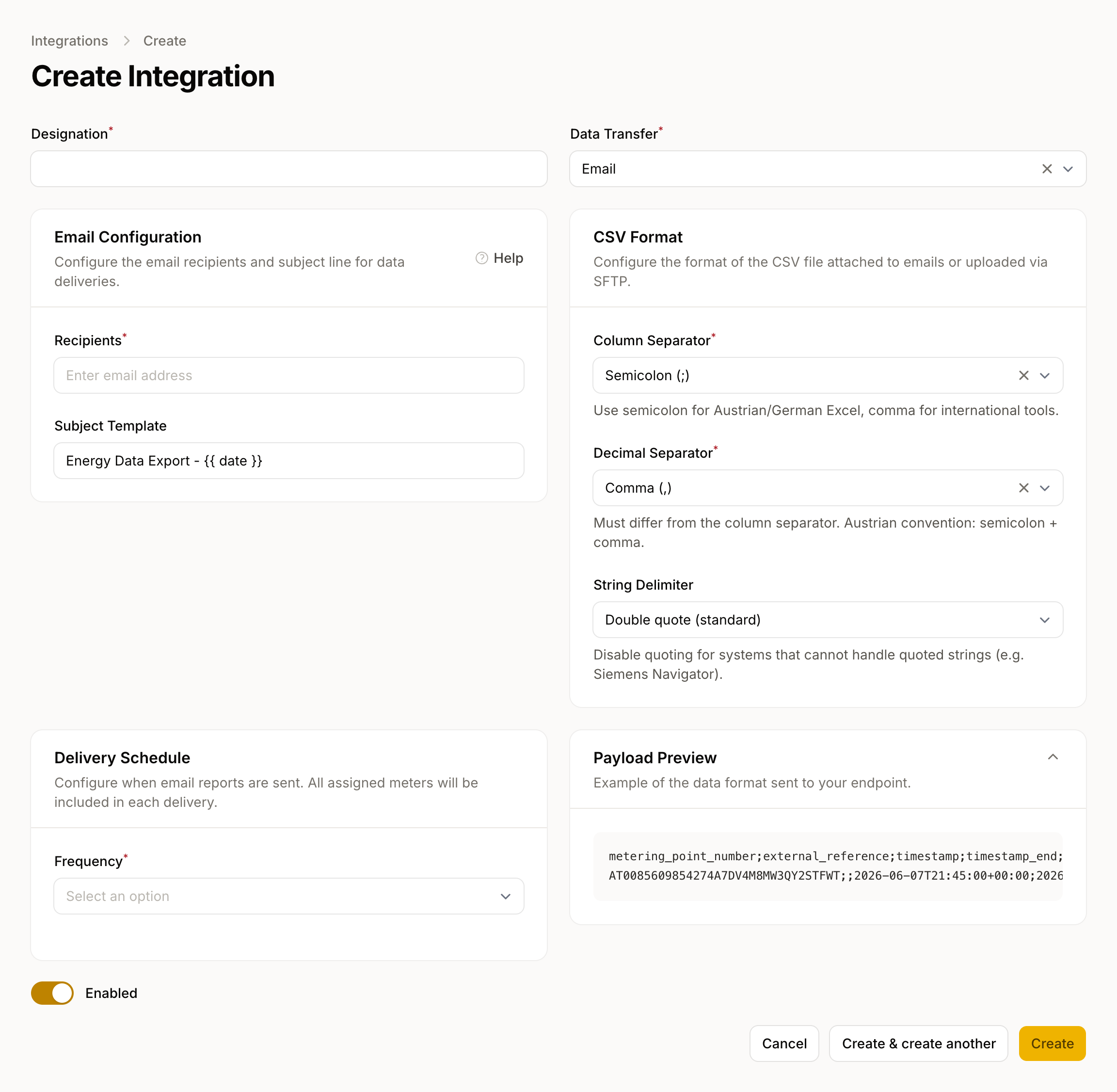
Set Up a Connection
- Go to Data → Integrations → New Integration.
- Select the type Email (CSV).
- Configure the connection:
| Field | Description |
|---|---|
| Recipients | One or more email addresses, entered one per address. Up to 20 recipients. |
| Subject Template | Email subject line. The placeholder {{ date }} is replaced with the delivery date (YYYY-MM-DD). |
| Frequency | Daily, weekly, or monthly (in the Delivery Schedule section) |
| Time | Time of delivery (local time) |
- Save the connection and assign the meters you want under Assigned meters.
File Format
The CSV file is UTF-8 encoded. The defaults are a semicolon (;) as the column separator and a comma (,) as the decimal separator, compatible with Microsoft Excel and LibreOffice Calc; you can change both in the connection's CSV Format section.
Every file starts with a header row. The columns come in this order:
metering_point_number, internal_reference, timestamp, timestamp_end, value, unit, obis_code, obis_description, quality
When to Use Email CSV
Email CSV is a good fit when:
- a recipient without a technical setup needs a recurring scheduled export,
- a downstream system imports CSV files via email,
- a time-controlled delivery is sufficient (rather than a push when data becomes available).
For delivery as soon as new data arrives, use Webhooks or MQTT.
