On this page
Team Settings
Open Team Settings from the team switcher in the sidebar.
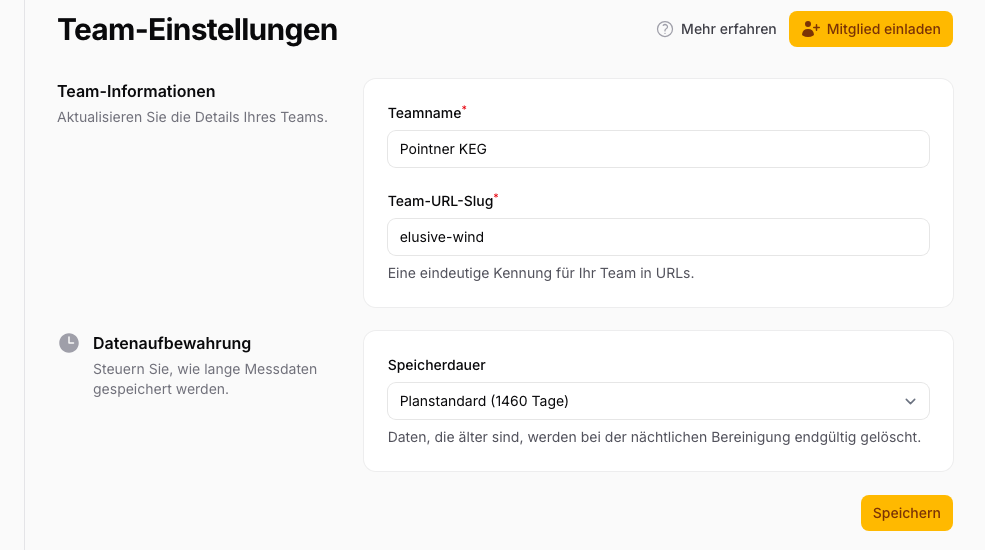
Team Name
The team name appears in the app navigation and in email notifications. You can change it at any time.
Team URL (Slug)
Available from the Plus plan onwards.
The team URL is your team's individual path in the app (e.g. energiedaten.at/app/my-company). You can choose a custom slug as long as it has not already been taken. Existing links to the old slug will stop working after a change.
Consent Purpose
Available from the Plus plan onwards.
Every consent request we send to a grid operator for one of your metering points carries a purpose text. By default it reads energiedaten.at - followed by your team name. With a custom purpose, your grid operator receives your own wording instead.
Enter the text in the Consent Purpose section, in the field Purpose. It can be up to 100 characters long. Leave the field empty to keep the default. The new text applies to consent requests sent after you save. When you connect a metering point, the form shows the purpose that will be sent. On plans below Plus, the section shows the default text for information only.
Data Retention
The maximum retention period is determined by your plan:
| Plan | Maximum Retention |
|---|---|
| Community | 3 months |
| Light | 1 year |
| Plus | 2 years |
| Pro | 3 years |
| Enterprise | Individually agreed |
You can set the retention period to a lower value to delete older data sooner — for example, for data protection reasons.
Warning: Reducing the retention period deletes metering data that falls outside the new time window permanently. This action cannot be undone.
When switching to a plan with a shorter retention period, data that exceeds the new limit is automatically deleted at the next monthly cleanup run.
