Set Up Webhooks
Available from the Light plan.
This article covers data-delivery webhooks: HTTP POST deliveries of your measurement data to an external endpoint as soon as new data becomes available.
Stripe-style event notifications for API resources (
meter.created,consent.granted,consent.revoked) are coming in Phase 2. For now, see Consent flow for status tracking.
A webhook is an HTTP POST request that energiedaten.at automatically sends to your URL as soon as new readings arrive for an assigned meter. This gives external systems the data immediately; no polling required. The data itself is T-1 (values from the previous day).
Create a Connection
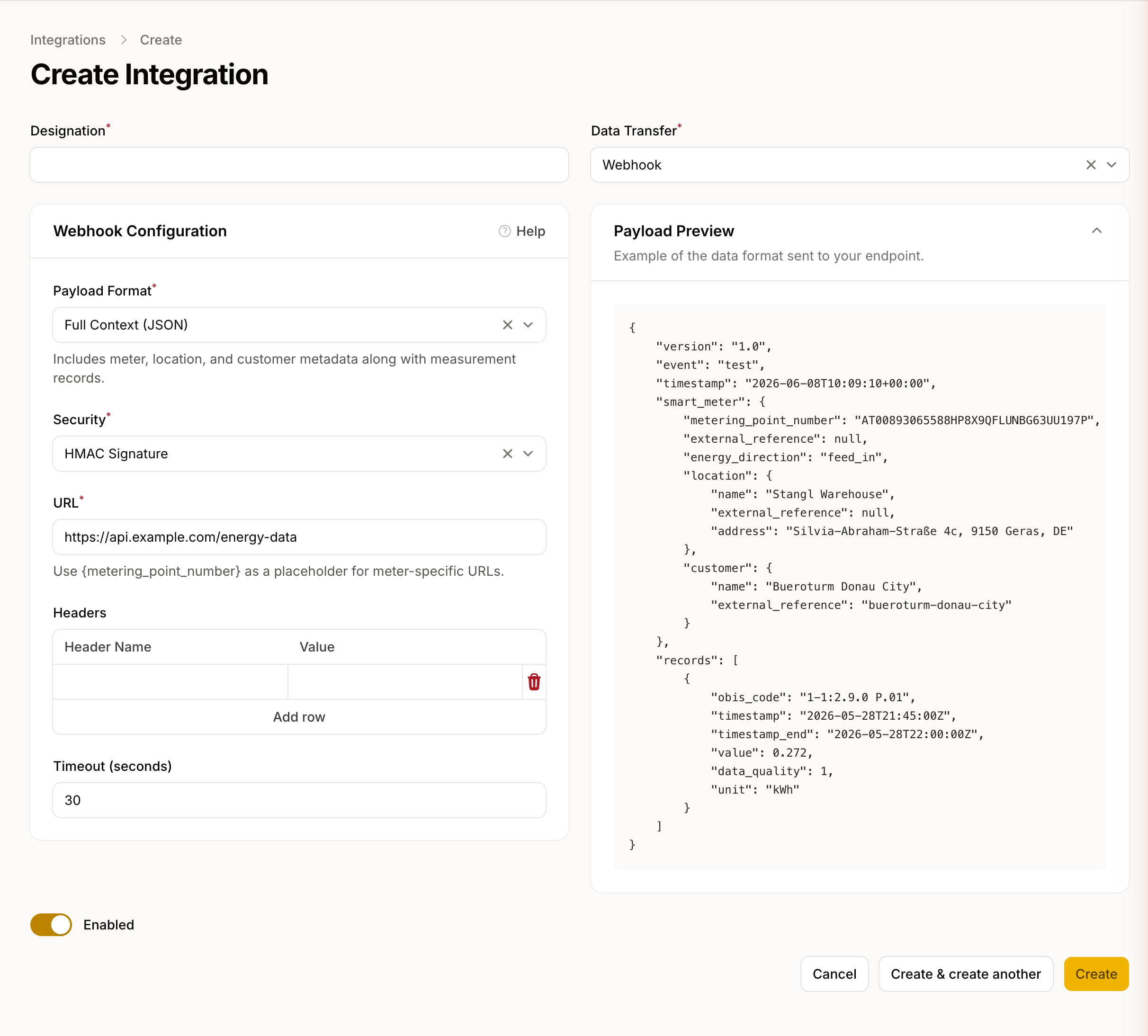
- Go to Data → Integrations → New Integration.
- Select the type Webhook.
- Enter the target URL (must be HTTPS).
- Choose the desired security method.
- Save the connection.
- Assign the meters you want under Assigned meters.
Security Methods
| Method | Use case |
|---|---|
| None | For internal systems without external exposure |
| Basic Auth | Username and password, Base64-encoded |
| Bearer Token | Static token sent in the Authorization: Bearer header; simple to implement, but does not verify payload integrity |
| HMAC Signature (recommended) | Cryptographic signature verification; verifies both origin and payload integrity |
Payload Format
Each request contains a JSON body with the meter metadata and measurement records:
{
    "version": "1.0",
    "event": "measurement.created",
    "timestamp": "2025-03-16T12:00:00+01:00",
    "smart_meter": {
        "metering_point_number": "AT0010000000000000001000000000001",
        "external_reference": "building-7-floor-2",
        "energy_direction": "consumption",
        "location": {
            "name": "Headquarter",
            "external_reference": "HQ-01",
            "address": "Musterstraße 1, 1010 Wien"
        },
        "customer": {
            "name": "Muster GmbH",
            "external_reference": "C-1234"
        }
    },
    "records": [
        {
            "obis_code": "1-1:1.9.0 P.01",
            "timestamp": "2025-03-15T23:00:00Z",
            "timestamp_end": "2025-03-15T23:15:00Z",
            "value": 0.285,
            "data_quality": 1,
            "unit": "kWh"
        }
    ]
}
| Field | Description |
|---|---|
event |
measurement.created for real deliveries, test for test deliveries |
smart_meter.metering_point_number |
33-character Austrian metering point ID (Zählpunkt) |
smart_meter.location |
null if no location is assigned |
smart_meter.customer |
null if no customer is assigned or the Customer Management feature is not included in your plan |
records |
Array of quarter-hour readings for the meter |
data_quality |
1 = Measured, 2 = Estimated, 3 = Unreliable |
Test a Connection
Click Send Test to send a test delivery with a sample payload to your URL. The response status code is displayed immediately. A 2xx response is considered successful.
For experts
HMAC Signature Verification
When HMAC signing is enabled, energiedaten.at adds the Signature header to the request. The value is an HMAC-SHA256 hex digest of the JSON request body, signed with your configured signing secret.
To verify, compute hash_hmac('sha256', $requestBody, $secret) and compare with the header value using a timing-safe comparison.
Retry Behaviour
On failure (no 2xx or timeout), the delivery is retried up to 2 times with exponential backoff. After 5 consecutive failed deliveries, the connection is automatically deactivated. Failed deliveries can be resent for a date range you choose, see Delivery Logs & Errors.
