Measurement Data
On the Measurement Data page you can view your readings as a table and download them as a CSV file. You can also see how reliable your data is.
Measurement data table
The table shows your readings with Meter, Timestamp, Measurement (OBIS code), Value (kWh), and Data Quality. The most recent values appear first by default. The filters above let you narrow down by location, meter, measurement, and data quality.
CSV export
Open the Export menu above the measurement data table and choose CSV to download the measurement data for the selected period. The file follows your table filters and is sorted chronologically, oldest value first. If you take part in an energy community, CSV (with EC column) is available as well. Only that variant contains the values per energy community. The CSV file uses a semicolon as the delimiter and can be opened directly in Excel, Google Sheets, or your energy management system.
Data quality
The data-quality chart shows a donut chart of what share of your readings falls into each quality level:
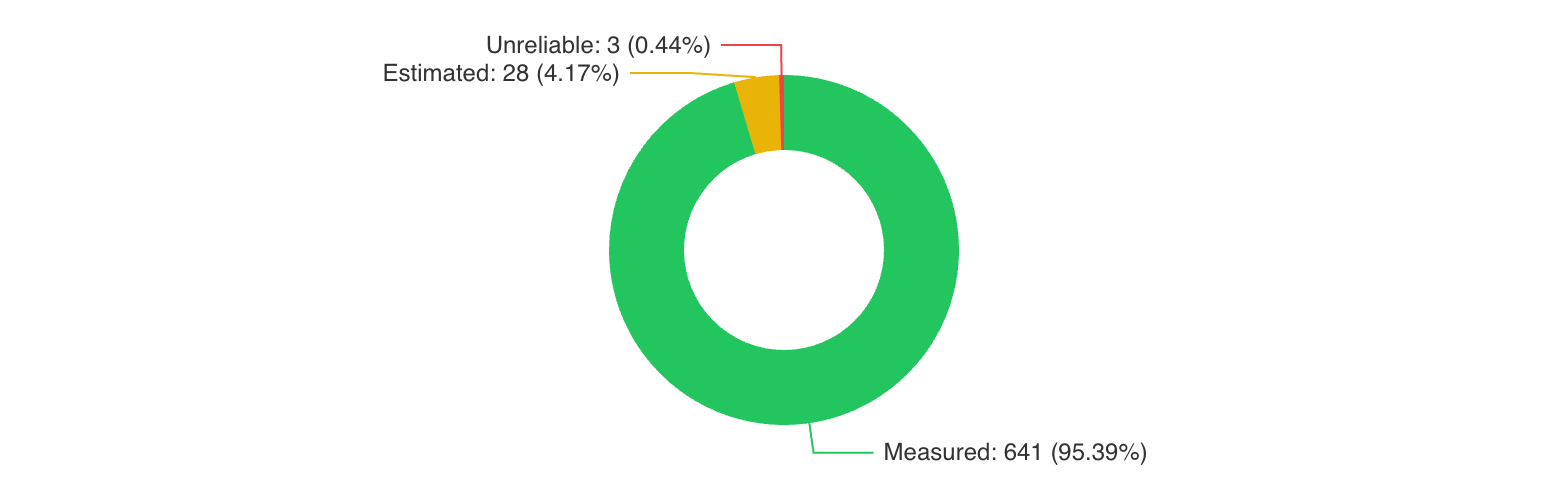
- Measured (L1, green): Actually measured values. This is the normal case. Aim for a share above 95%.
- Estimated (L2, yellow): Values estimated by the grid operator because the measured value could not be transmitted. Individual estimated values are normal and have little effect on the analysis.
- Unreliable (L3, red): Preliminary values with limited reliability, not suitable for billing. They are replaced by the grid operator with measured or estimated values within 60 days.
If your share of measured values is consistently below 95%, this may indicate a communication problem with the smart meter. In that case, contact your grid operator.
For experts
The quality levels (L1, L2, L3) follow the OBIS code conventions of the Austrian energy market. The exchange period for L3 values is 16 calendar days for energy communities and 60 days for general data exchange. L3 values must not be used for energy billing. After this period the grid operator replaces L3 values with measured or best-estimated values.
What do the OBIS codes mean?
The Measurement column shows what was measured: for most meters Grid consumption (1-1:1.9.0 P.01) or Grid feed-in (1-1:2.9.0 P.01). Which other codes exist, which one your analyses use, and why G.01 and P.01 must not be added together is explained in Understanding OBIS codes.
