The Consent Process
After clicking "Connect", your smart meter goes through several steps before the first data flows. Here we explain what happens at each step and what you need to do.
Status overview
In the meter overview, you can see the current process status of each meter at a glance — from "Waiting for confirmation" to "Failed":
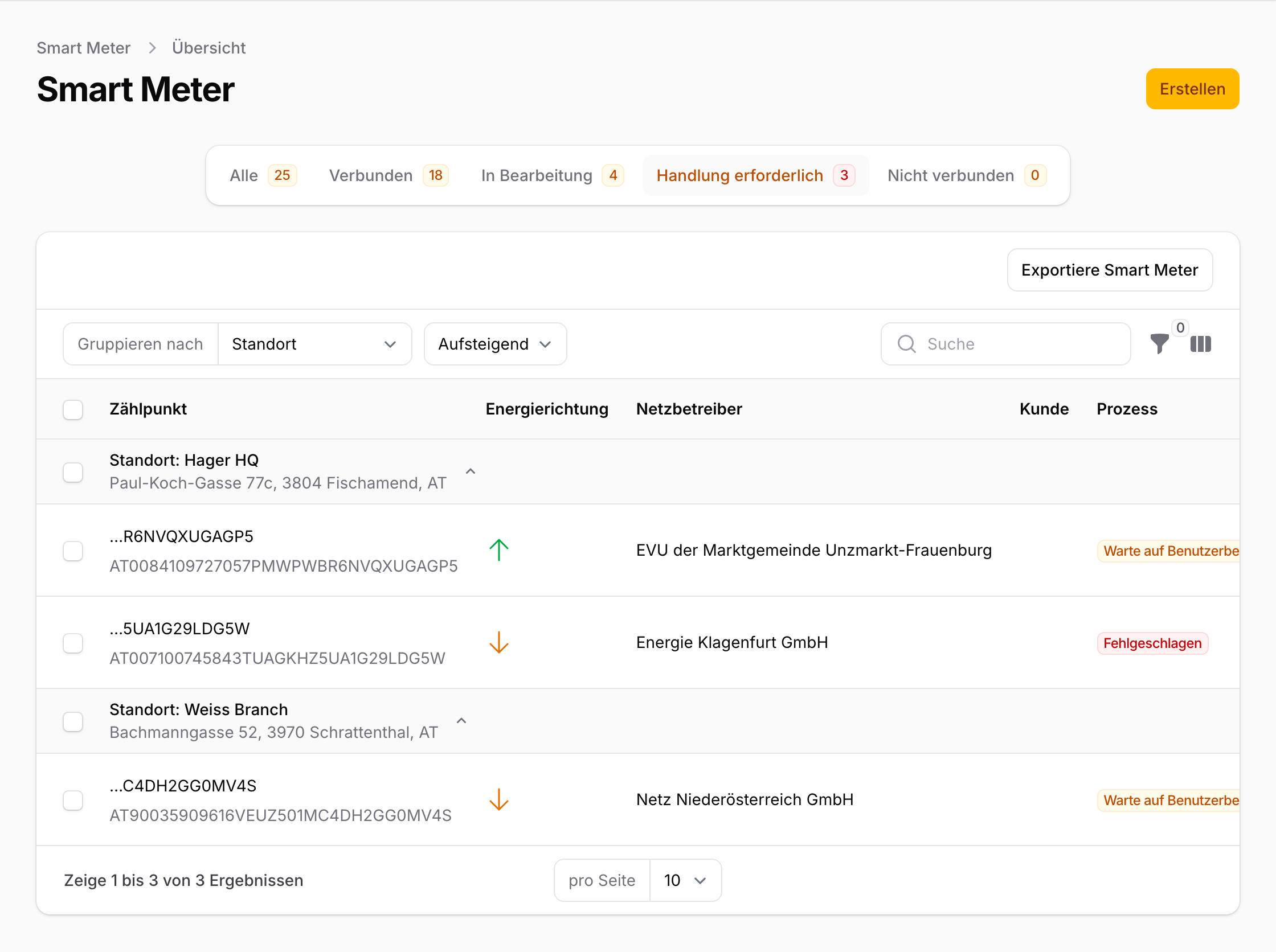
The four phases
1. Smart meter added
You've entered your Zählpunkt number. The meter is created in your account but not yet connected to the EDA network.
2. Request sent to the grid operator
After clicking "Connect", we send a data request to your grid operator. They check whether the Zählpunkt number is valid and exists in their system.
What you need to do: Nothing. The page updates automatically every 30 seconds. The grid operator typically responds within a few minutes.
What can go wrong: The grid operator may reject the request — for example if the Zählpunkt number does not exist or no smart meter is installed. In that case, you'll see an error message with the exact reason. More at Common errors.
3. Confirm consent in the portal
Once the grid operator accepts the request, you must confirm the data release in their online portal. This is a legally required step — the grid operator may only share your data after your explicit consent.
What you need to do:
- Click "Open grid operator portal" — the link takes you directly to your grid operator's portal.
- Log in there (using your grid operator credentials, not your energiedaten.at login).
- Confirm the pending data request.
Time limit: You have 10 business days. After that, the request expires automatically and you'll need to start the process again.
4. Data flows
After confirmation, your meter is connected. Energy data is delivered with a one-day delay (T-1) — meaning you see yesterday's data today.
What you need to do: Nothing. Data is retrieved automatically and displayed in your account. The first readings typically arrive within 1–2 days.
More at First Data & Next Steps.
Connecting meters on behalf of others
If you're an energy service provider, property manager, or energy consultant connecting meters for your clients, there's an important distinction: you enter the Zählpunkt number, but the meter owner must confirm consent in their grid operator's portal. These are two different people.
What this means in practice
- You add the meter in energiedaten.at and initiate the connection.
- The meter owner (your client, tenant, or building owner) receives the request in their grid operator's portal.
- Only the meter owner can confirm the release — you cannot complete this step on their behalf.
Tips for coordination
- Inform your client in advance that consent in the grid operator's portal will be required. Name the grid operator so your client knows where to log in.
- Timing: The meter owner has 10 business days to confirm the request. After that it expires and must be resubmitted.
- Multiple meters, multiple grid operators: For portfolios spanning several locations, each meter may belong to a different grid operator. The meter owner may need to log in to different portals.
- Login credentials: Many meter owners don't know they have a grid operator portal, or have lost their credentials. Recommend that they request access from their grid operator in advance.
Tracking status
You can see the consent status of each meter in your meter overview. Pending requests are shown with the status "Waiting for confirmation". This keeps you on top of things even when connecting dozens of meters in parallel.
Revoking consent
You can stop data sharing at any time — in two ways:
- Via energiedaten.at: Click "Disconnect" on the smart meter detail page. We'll send a revocation message to the grid operator.
- Via your grid operator's portal: You can also revoke consent directly in your grid operator's portal. The change is automatically forwarded to us.
In both cases, no further data will be transmitted once the revocation is confirmed.